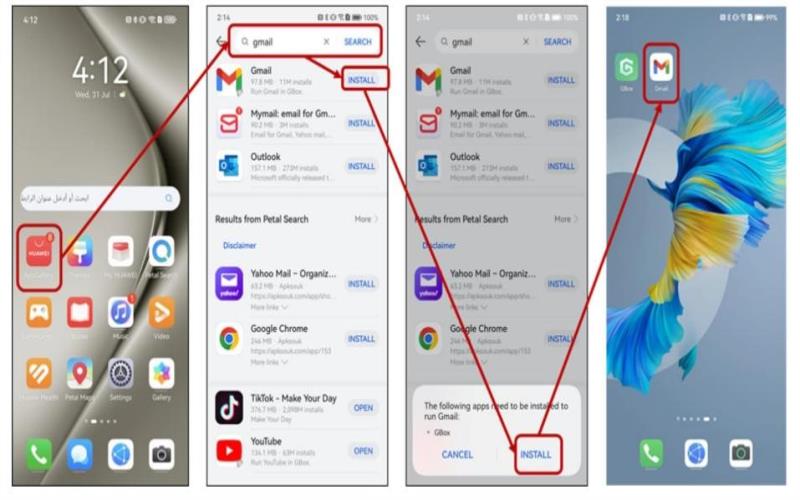
Yes, Gmail is available on AppGallery. Some people hesitate to buy HUAWEI because of this prevailing question on everyone’s mind – does huawei have gmail app? The company has provided ways for its users to access Gmail and other Google apps and services using HUAWEI mobile devices. And the process is just as easy as installing it on other brands. This article will teach you how to install and use Gmail on your HUAWEI through its selection on HUAWEI AppGallery. Make sure to go through the steps to ensure a smooth user experience on your HUAWEI device.
How to Use Gmail on HUAWEI?
Open AppGallery
AppGallery is the application store of the HUAWEI brand. Do you also have this thought like most people- does huawei have gmail? The answer to this question is a resounding yes. If you want to install Gmail on your mobile device, the first thing that you need to do is to look for the AppGallery on your phone or tablet. It is a standard app installed on HUAWEI devices. It is actually a distribution source that HUAWEI users go to for their software needs.
Look for the Gmail app
The next thing that you do is to look for the Gmail app. Type Gmail on the search bar. The Gmail app will appear on your screen. You should not worry about the apps that come up on HUAWEI AppGallery. All the apps in this distributing platform are tested and verified by HUAWEI itself. This gives you assurance that the Gmail application that you will install works.
Install the Gmail app
Once you find the Gmail app, you can click “Install.” This will prompt you to either one of the two questions regarding additional tools that you need to install. If you own one of the HUAWEI Pura series, Nova 12 series, MatePad 11.5” S and SE 11, and the MatePad Pro 12.2 and 12 X, you will be asked to install microG service and companion. For people who own other HUAWEI devices, you will be prompted to install Gbox. You just go ahead and install either one. Both will help you navigate your Gmail app as well as other Google apps and services.
Try it out
After installing the Gmail app, you can start trying it out. First-time Gmail users can create their Gmail account by inputting their email address and password. You should provide a unique email address and a strong password for your Gmail account for personalization and security. Gmail also offers different customizations on its interface and inbox. You can go to Gmail Settings to try the different options available for users.
Update your Gmail app
Your Gmail app will only continue to work if it is constantly being updated. The creators of Gmail will continue to update the app to ensure a seamless operation of the app along with your devices. However, if you do not switch it on, you might forget to update the apps yourself. To ensure that your Gmail app is always updated, you can do two things – one, you can manually update it by going to AppGallery and clicking “Update” on your device, and two, you can go to the menu and automatically update your apps every time. Be sure to update your Gmail app to have full access to its controls.

Conclusion
HUAWEI offers a lot of features on its phones and tablets. With the addition of Google apps and services, you have to seriously consider buying HUAWEI devices. People may ask, does huawei have gmail app? Rightfully so, you must have this question on your mind, knowing about this HUAWEI concern. Gmail is definitely available on any HUAWEI mobile device. It is amazing how much you can do with all the capabilities of these products.